Week 10 – Adaptive and Assistive Technologies

 How are public libraries responding to the issue of digital inclusion and people with disabilities?

What technology are they using and / or what changes have been made?

How does it work?

Fitzgerald et. al. notes that both “physical and geographical access to digital technology” (2015, p. 214) must be considered in relation to the issue of digital inclusion. The authors note that Campaspe Regional Library in Victoria has been recognized with an award in relation to their “Being Connected: Libraries and Autism” program which focuses on access to the library for children with autism (p. 226). Some of the measures identified include:

  • All staff, including front-line staff, received respite training (p. 227)
  • Incorporation of community groups to facilitate events, such as photography clubs (p. 227)
  • iPads and Boardmarker online purchased to facilitate communication and integration with the local special needs school (p. 227), otherwise called “mobile interactive learning stations” (Mustey, 2014)

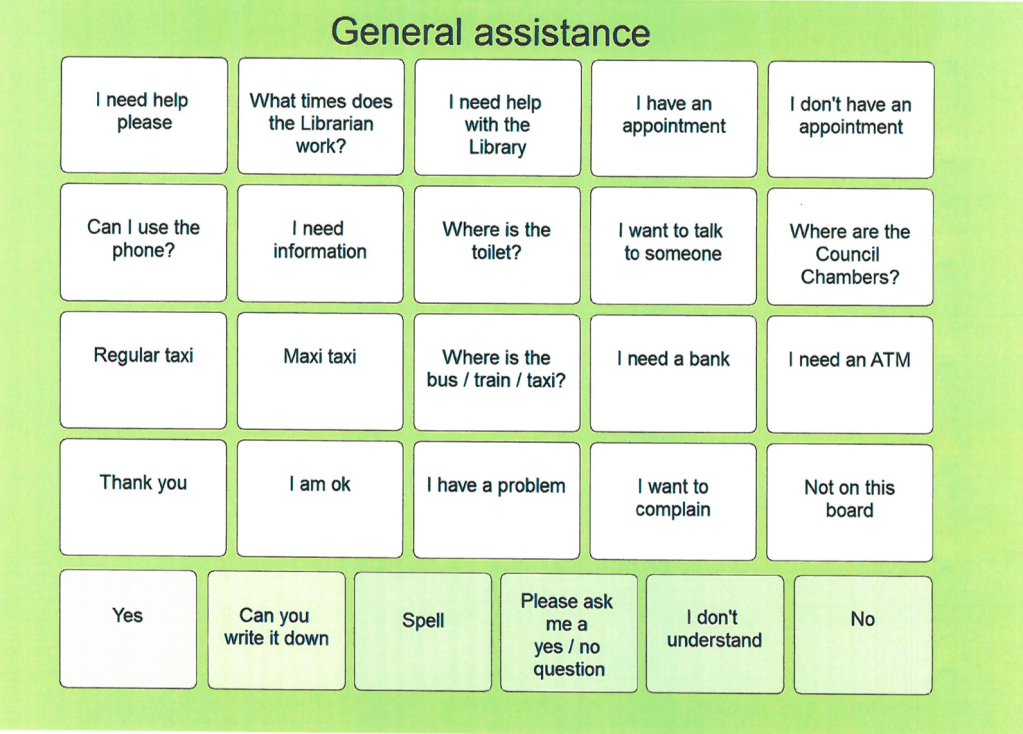
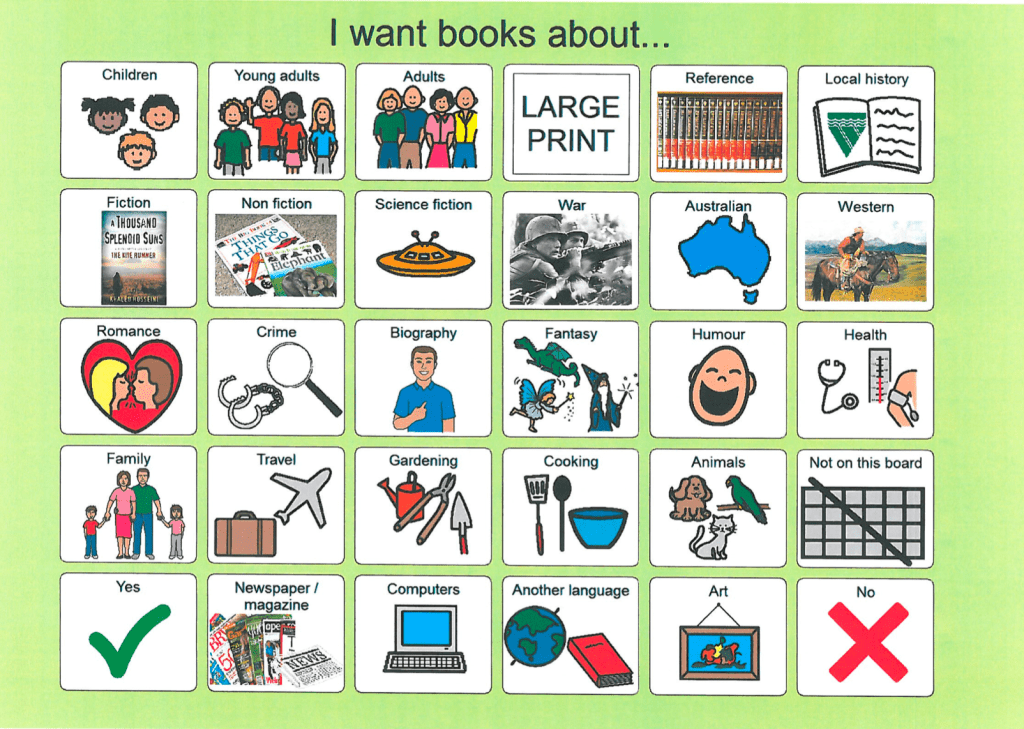
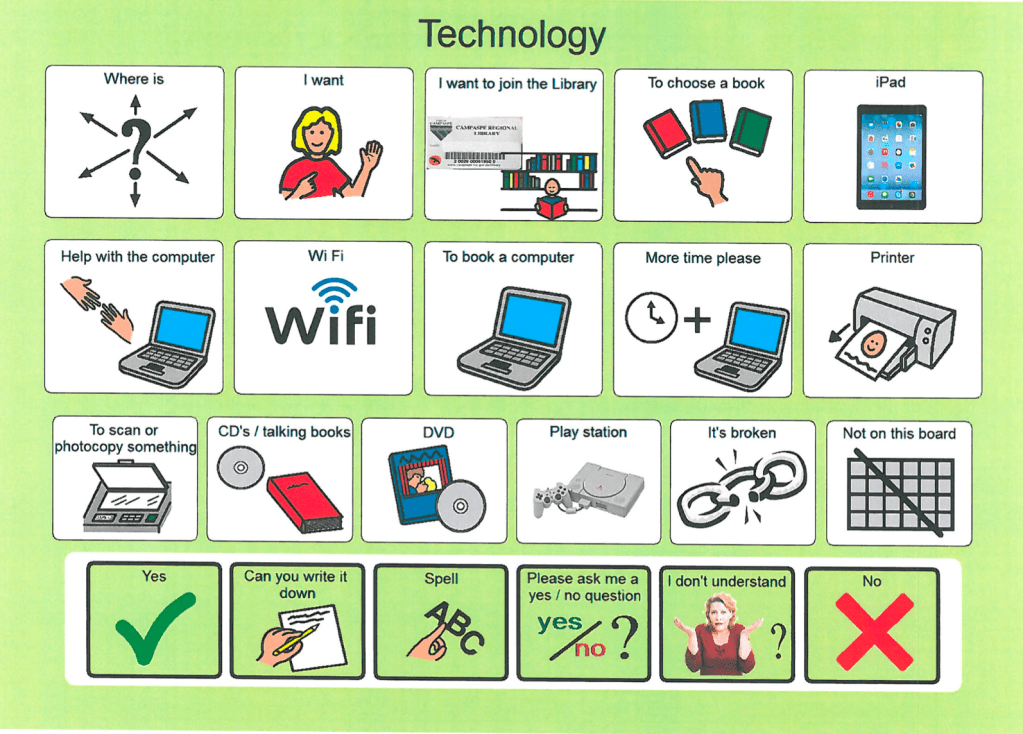
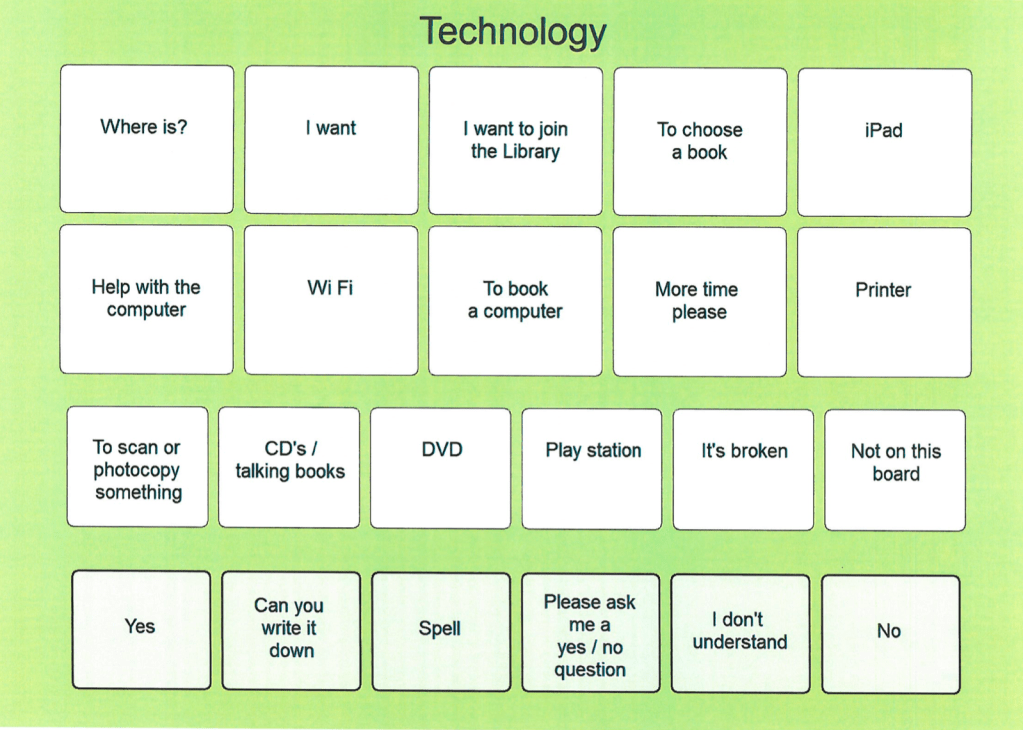
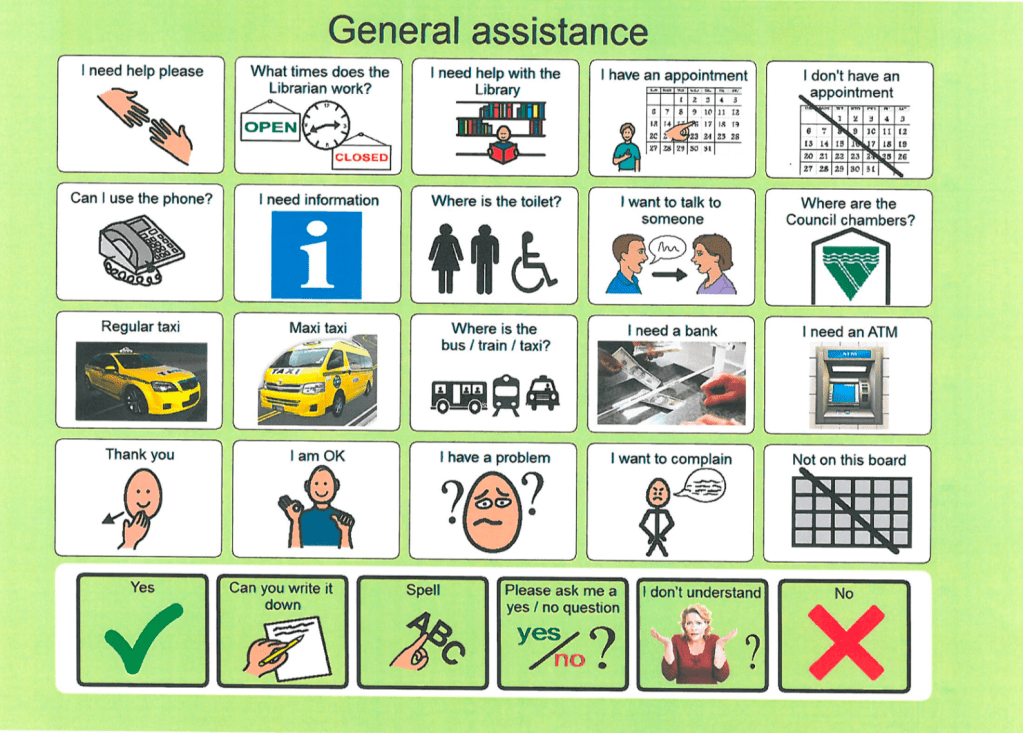
Additionally, Campaspe Regional Library has introduced “communication access boards” for their patrons as per the photos below (Campaspe Regional Library Services, Communication Access, 2019). These boards include a mixture of text and graphic based assistance cues; with high contrast and large graphics used. I would argue that the library has used publishing programs to create a unique tool to assist their patrons with disabilities that affect their communication.  Talking newspapers were also introduced (Campaspe Regional Library wins state award, 2018).

Beyond use of technology, the library also introduced the “Next Chapter Book Club” for people with intellectual and physical disabilities. “Echo reading” was used, where book club members who were illiterate would repeat back what was read aloud (Romensky, 2017).

Communication boards
(Campaspe Regional Library Services, Communication boards, 2019).
Who it benefits?

Those who directly benefit from disability inclusion services are of course, those who experience disability. Increasing social and cultural inclusion correlates directly with increased mental wellbeing, and also increased opportunities for economic engagement through the provision of accessible digital devices (Aitken, 2017; Australian Government Department of Social Services, 2012). It also goes towards increases in “pride in their caregiving skills” for carers with increases in accessible means of disability inclusion (Arabit, et. al, 2018; Clover, 2017). Increases in library staff communication skills and confidence have been observed by Henczel and O’Brien in 2011 relation to library staff disability training, with one focus group participant even stating that increases in inclusion in the library setting is “inspirational” (p. 70).

What are the implications for the information service?

Are there any other considerations? 

It is disappointing to note that in 2019 the Campaspe Regional Council announced their decision to withdraw from the provision and delivery of disability services within the region (Decision made to withdraw from aged and disability services, 2019). The extent to which this may impact accessible services in the library is yet to be determined by the council, the library and the literature.

Strong and ongoing community leadership and advocacy is needed within the information service of public libraries to secure funding, as well as government receptiveness (Fitzgerald et. al., 2015, p. 229). The lack of research and reporting in the area of the accessibility of libraries in Australia is noted multiple times by Fitzgerald et. al. (2015, p. 232) especially from a local perspective. Libraries and information management academics may need to step up as leaders in this area of research and advocacy, even if informal, in order to drive continued change.

References

Aitken, Z., Krnjacki, L., Kavanagh, A., LaMontagne, M., & Milner, A. (2017). Does social support modify the effect of disability acquisition on mental health? A longitudinal study of Australian adults. Social Psychiatry and Psychiatric Epidemiology, 52(10), 1247–1255. https://doi.org/10.1007/s00127-017-1418-5.

Arabiat, D. H., Whitehead, L., & AL Jabery, M. (2018). The 12‐year prevalence and trends of childhood disabilities in Australia: Findings from the Survey of Disability, Aging and Carers. Child: Care, Health and Development, 44(5), 697–703. https://doi.org/10.1111/cch.12588

Australian Government Department of Social Services. (2012). Increasing accessibility library initiative. Retrieved from https://www.dss.gov.au/our-responsibilities/disability-and-carers/program-services/for-people-with-disability/increasing-accessibility-library-initiative.

Campaspe Regional Library Services. (2019). Communication access. Retrieved from: https://cprl.swft.ent.sirsidynix.net.au/client/en_AU/cprl/?rm=COMMUNICATION+0|||1|||0|||true&dt=list#.

Campaspe Regional Library Services. (2019). Communication boards. Retrieved from: https://cprl.swft.ent.sirsidynix.net.au/custom/web/content/cprl/CPCommBoards.pdf.

Campaspe Shire Council. (2019). Media Release: Decision made to withdraw from aged and disability services. Retrieved from: https://campaspe.vic.gov.au/council/news-and-media/media-releases/2019/10/16/decision-made-to-withdraw-from-aged-and-disability-services/.

Campaspe Shire Council. (2018). Media Release: Campaspe Regional Library wins state award. Retrieved from: https://www.campaspe.vic.gov.au/council/news-and-media/media-releases/2018/05/18/campaspe-regional-library-wins-state-award.

Clover, D. (2017). Meeting the needs of parents and carers within library services: responding to student voices at the University of East London. Retrieved from http://roar.uel.ac.uk/6001/1/Clover%20Meeting%20the%20needs%20of%20parents%20and%20carers.pdf.

Fitzgerald, B., Hawkins, W., Denison, T., & Kop, T. (2015). Digital inclusion, disability, and public libraries: A summary Australian perspective. In B. Wentz, P. T. Jaeger & J. C. Bertot (Eds.), Accessibility for persons with disabilities and the inclusive future of libraries, Advances in Librarianship, 40, 213 – 236.  DOI 10.1108/S0065-283020150000040019 

Henczel, S, & O’Brien, K. (2011). Developing Good Hearts: The Disability Awareness Training Scheme for Geelong Regional Libraries Staff. Australasian Public Libraries and Information Services, 24(2), 67–73.

Mustey, J. (2014). Pierre Gorman award goes to Campaspe libraries. Incite, 35(4), 12–13.

Romensky, L. (2017). Book club with a difference launched in Echuca. Retrieved from: https://www.abc.net.au/news/2017-03-17/australias-first-next-chapter-book-club-launched-in-echuca/8361508.
Updated week 4 post

Hi all,

I have noticed some interesting developments in GLAMR institutions using Web 3.0 technologies to maintain and increase services during the COVID-19 crisis.

I have updated my week 4 blog, which has an embedded video of a MONA live stream of a living “art work” in the gallery, if anyone would be interested in reading my view on this the link to this blog post is: https://techsavvydiane.tech.blog/2020/02/09/week-4-internet-content-and-information-services/

Week 9 – Web Technologies and LMS

What do you think are the advantages and disadvantages of having a statewide centralised LMS?

STAKEHOLDER: LIBRARY USER

Advantages

Access to special interest/general items not owned by their library, especially for rural and isolated users; one of the main points illustrated by the following video published by Libraries SA in relation to the OneCard Network:

Comprehensive and ongoing live updates to the system allows user to access the most up to date information

Disadvantages

Duplicated items means that copy, not title holds may sometimes be made due to user not understanding difference in hold type- increasing wait times

Lack of understanding of how to use a complex database

User may not understand why particular titles might only be held at regional/school libraries and complex borrowing rules (for example, at Tea Tree Gully Library we have a “top picks” section which can not be placed on hold, but other copies of the same title might exist in our centralised LMS and can be put on hold

STAKEHOLDER: COUNTRY LIBRARY

Advantages

Access to items statewide for their community that the library does not have the budget for or space for

Disadvantages

Lack of budget for training and upskilling to use and maintain the database and/or complex software

STAKEHOLDER: COURIER SERVICES

Advantages

Increase in economic activity and opportunities

Appealling to shareholders to contribute to a public service

Disadvantages

Increased environmental impact, especially in the case of South Australia where a centralised sorting facility exists

Increases in inefficiency: double handling of most items

Increased manual labour means increased risks within the workplace

See the below Facebook post from Tea Tree Gully Library regarding Australia Post and to see the black cartons which are used to transport all books located in or returned to the library to go to the centralised sorting facility, noting that the post indicates these boxes are indeed “heavy” and there is only one courier worker travelling to each library daily to facilitate this service.

OTHER POINTS

For the funding and controlling body costs may increase.

Additionally, larger LMS allow mass updates but may be harder to maintain due to the sheer volume of information it contains (though the size of the LMS database is optimised through collaboration). Dysfunctional features and incorrectly coded information are statewide, rather than localised/once off.

Overall I think a centralised LMS has it challenges, but is extremely beneficial from a public policy perspective in terms of increasing the civic community’s access to information and resources. Additionally, it is beneficial for almost all libraries as it increases circulation numbers. Country libraries especially benefit due to their relative isolation and often lower budgets compared to metropolitan libraries. There are issues with double handling, particularly if the associated physical sorting system is also centralised, as it is at the moment in South Australia. An examination of how to reduce double handling of items will be important in the future to maximise the benefits of the system but minimise inefficiencies and decrease physical exertion as a workplace hazard.

REFERENCES

LibrariesSA Youtube Channel. (2012). One Card Network – What’s it all about? (South Australia’s public libraries). Retrieved from: https://www.youtube.com/watch?v=fNUQcVhpmqQ.

Tea Tree Gully Library Facebook. (2018) Facebook post regarding courier services. Retrieved from: https://www.facebook.com/ttglibrary/posts/1965561400198890.

Yang, S. Q. and Lee, Y. Y. (2015). Library Management Services. In Yang, S. Q., & Lee, Y. Y. (Eds.) Emerging Technologies for Librarians : A Practical Guide. (pp. 17-30). London: Elsevier Science & Technology.

Yang, S. Q. and Lee, Y. Y. (2015). Web Scale Discovery Series. In Yang, S. Q., & Lee, Y. Y. (Eds.) Emerging Technologies for Librarians : A Practical Guide. (pp. 31-39). London: Elsevier Science & Technology.

Yang, S. Q. and Lee, Y. Y. (2015). Evolving Digital Library and Library Digitization. In Yang, S. Q., & Lee, Y. Y. (Eds.) Emerging Technologies for Librarians : A Practical Guide. (pp. 69-102). London: Elsevier Science & Technology.

Week 8 – Web Technologies

Improvement 1.

Piola (2018) suggests having a search that would allow users to toggle between the website search and catalogue search – this is a functional that is missing on my website! Definitely a limitation of WordPress as a CMS was this inability to toggle in general. Additionally though, the fact is the catalogue search is a LMS shared statewide for the OneCard network, this external search will be present until the OneCard database can be integrated into local networks also.

Improvement 2:
Gambrell (2015) suggests that all websites must be accessible using a keyboard only. This functionality is missing from the website I designed, and this is far beyond my technical capabilities to address but is an improvement that could be made.

Improvement 3

User and functionality testing is essential to judge the user experience (Gambrell, 2015; Hadley, 2017). User surveys were suggested in the design report; but now armed with the knowledge of third party testing being available this would be one route to take in the assessment of user experience.

Improvement 4

Whilst Grambell (2015) and Piola (2018) are rather anti-carousal, Hadley (2017) advocates for the use of them. I would have definitely been inclined to include a carousal in my website had I had the technical know-how. Given how expansive library offerings can be, an automatic carousal on the homepage of my website would be one way of educating the user on different events that were occurring within the library space that they might not have necessarily discovered otherwise. Design aspects to consider would be that auto scrolling would have to be disabled on mobile devices, and that back and forth buttons would be necessary to incorporate due to users potentially wanting to go back to an item they missed or want further information on (Pernice, 2013).

Improvement 5

Gambrell (2015) links an article by Kupersmith (2012) which identifies, through user surveys, that even terms such as “catalogue” and “reference” are not understood widely by library users. I would therefore change some of the wording on my site. Specifically Kupersmith (2012) notes the effectiveness of combining photos with search functions to indicate to the website user what they will search. One example identified was where a university library’s website included an “icon” of magazines and newspapers with the words “article search” prominent overlayed, in one section of their site- which made it clear what that particular search function was available at that link.

References

Hadley, P. (2017). What do the best museum websites all do? Cogapp. Retrieved from https://blog.cogapp.com/what-do-the-best-museum-websites-all-do-8d6727504605

Gambrell, K. (2015). 7 best practices for creating a user friendly library website. EBSCO. Retrieved from https://www.ebsco.com/blog/article/7-best-practices-for-creating-a-user-friendly-library-website.

Kupersmith, J. (2012). Library Terms That Users Understand. UC Berkeley: Library. Retrieved from https://escholarship.org/uc/item/3qq499w7.

Pernice, K. (2013). Carousel Usability: Designing an Effective UI for Websites with Content Overload. NN Group. Retrieved from: https://www.nngroup.com/articles/designing-effective-carousels/.

Piola. (2018). 8 tips to improve your library’s website design. Retrieved from https://meetpiola.com/8-tips-to-improve-your-librarys-website-design/.

Week 6 – Web Design

Hi all, apologies on this post being late. I moved house two weeks ago and started a new job today- so things have been quite crazy!

I have chosen to analyse the Moscow Museum of Modern Art website located in English, at the following link: http://www.mmoma.ru/en/. Hopefully such a unique case analysis will garner your attention despite my tardiness!

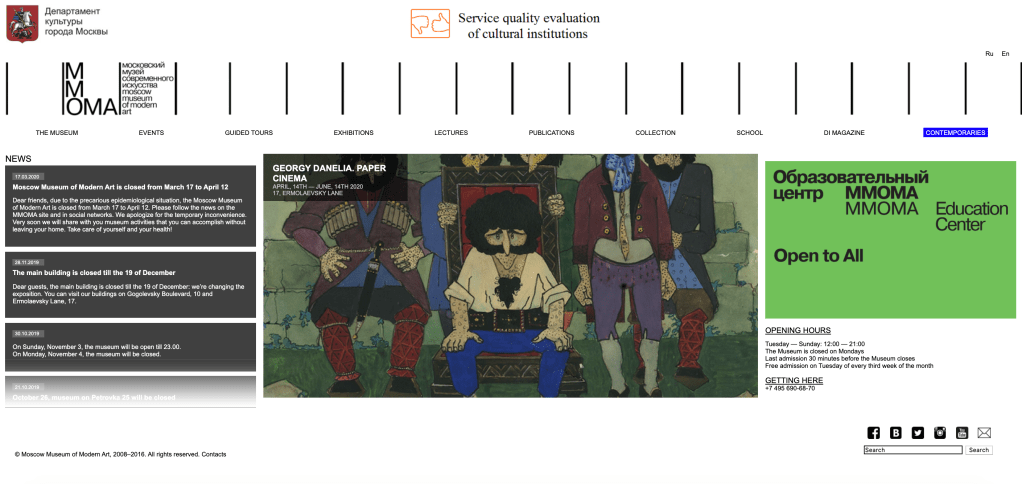
The website has a fast navigation bar, which details the links that people are most likely to click at the top of their website. They have their social connect widgets bottom right, which is tolerable, however, their search bar is the last thing on the whole web page – under these social widgets! I would suggest as my first immediate improvement that the search bar be located at the top of the web page. See below screenshot of the search bar located in the bottom right hand corner of their home page:

The webpage otherwise loosely follows the “F” shape design placement. The dynamic design means that they utilise what they show on the main page: a news feed, followed by rotating images of exhibitions (the MOMA is spread across 6 venues – so the organisation hosts many different exhibitions including different varieties of exhibitions). Their contact details and details of their educational events are then the two prongs of the “F.” Overall, I think the website has a very good organisational structure and every link I click is reliably returning the affiliated page.

In terms of accessibility, there are little image descriptions available. This is strange because of their progressive role within Russia- and their landmark 2019 exhibition “Touch!” which focussed on creating an inclusive museum environment for visitors with disabilities (Moscow Museum of Modern Art, 2020b). They do have high contrast between backgrounds and texts, text is able to be made larger without affecting website views, and the links are accurate – with input fields also labelled clearly, and the website displays multiple ways of finding information (Government of Western Australia, n.d.; Yang and Lee, 2015, pp. 189-190). The imagery of the museum and people at the museum is emotive (Hadley, 2017), especially in their educational pages. The style and layout of the website is consistent throughout each page (Yang and Lee, 2015, p. 197). Language is not technical which increases the “universality” of access to the website (Gambrell, 2015).

References:

Gambrell, K. (2015). 7 best practices for creating a user friendly library website. Retrieved from https://www.ebsco.com/blog/article/7-best-practices-for-creating-a-user-friendly-library-website.

Government of Western Australia. (n.d.). Tips to make your website accessible. Retrieved from: http://www.disability.wa.gov.au/Global/Publications/Understanding%20disability/Built%20environment/Accessible%20websites%20checklist.pdf.

Hadley, P. (2017). What do the best museum websites all do? Retrieved from: https://blog.cogapp.com/what-do-the-best-museum-websites-all-do-8d6727504605.

Moscow Museum of Modern Art (2020a). Retrieved from: http://www.mmoma.ru/en/.

Moscow Museum of Modern Art (2020b) For Visitors with Intellectual or Developmental Disabilities. Retrieved from: http://Www.Mmoma.Ru/En/Guided_Tours/Accessibility/For_Visitors_With_Intellectual_Or_Developmental_Disabilities/.

Yang, S. Q. and Lee, Y. Y. (2015). Understanding Web Design andWeb Content Management. In Yang, S. Q., & Lee, Y. Y. (Eds.) Emerging Technologies for Librarians : A Practical Guide. (pp. 185-200). London: Elsevier Science & Technology.

Week 5 – Information Retrieval and Internet Search

ARTICLE ANALYSIS

My first thoughts when reading Arvanitakis’ 2017 article regarding the opaque algorithms that Facebook and Google use, was that it was opinionated to its own detriment. References to pop culture, such as House of Cards, and hyperbole affected the credibility of his otherwise valid points and credibility as a professor and university Chancellor (Western Sydney University, 2020) . A key point that is missing from his piece is to at least broadly define the parameters of his discussion. Kassan in 2018 convincingly points out the way in which the term “algorithm” in and of itself has veered away from having a precise definition and has instead become a “ubiquitous” cultural phenomenon which makes little sense to the lay person in the real world.

I believe that individuals are aware that their data is being collected and used by companies, however, may not fully be aware of the potential consequences of big data and metadata retention and distribution. Coming from an international relations and law undergraduate background I would be particularly concerned about how data collected online can impact upon the civil liberties of citizens in any given country; particularly in light of Snowden’s revelations regarding telephonic metadata collection under the United States Patriot Act in 2013. Many politicians and liberal scholars suggest that building in checks and balance processes would go towards mitigating the unintended use of data by nation state governments, for the civic good (Hu, 2018; Huddy, Khatid and Capelos, 2002; Stoycheff et. al., 2017) These regulatory and potentially legislative suggestions to combat the unethical or illegal use of personal data arguably is just as open to “interpretive liberties” though (Margulies, 2014, p. 6).

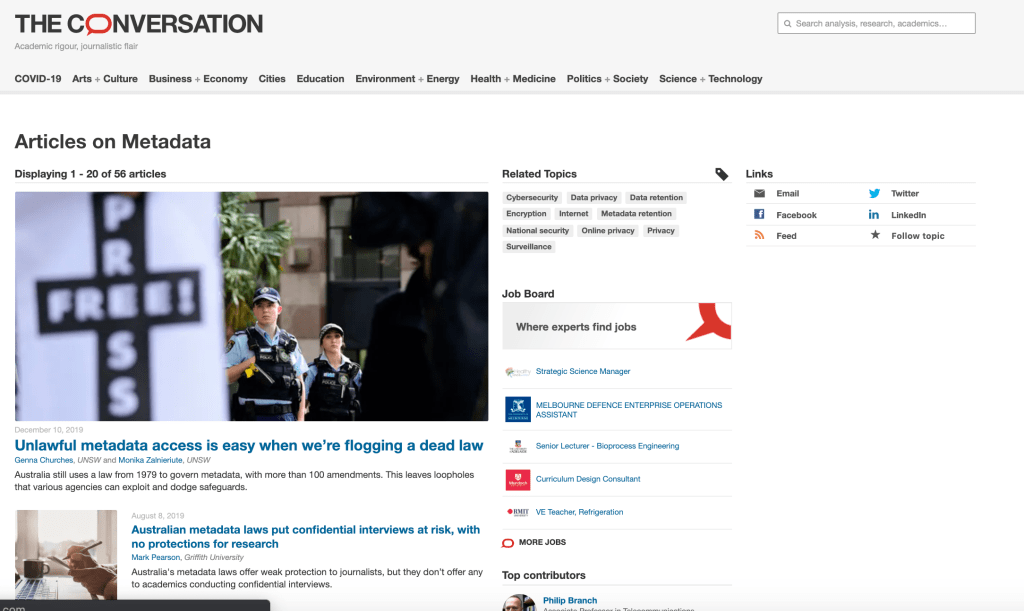
In thinking about what I was going to write for this weeks blog, I at first only briefly considered the question of whether university was the right medium through which to education people on data ethics. Writing this post today, however, and thinking about how inaccessible technological and civil rights-based concepts are to so many has me decisively opposed to universities being the sole educator on this type of information. Universities do remain an extremely privileged institution in society and navigating databases to try and inform myself on the questions posed by this weeks assignment was extremely difficult. Not only did I find myself encountering the age old academic dilemma of having to amend my searches, as per Boolean tactics touched upon in the lecture, to find relevant information- but a lot of these articles were very technically written and presuppose prior academic knowledge. Clayton in 2015 identified that publicly accessible journalism through collaboration between journalists and academics, such as The Conversation, work towards breaking down the “opaque” academic concepts into accessible information. The Conversation has a separate tag for “metadata” in it’s indexing system as per the following link: https://theconversation.com/au/topics/metadata-6464. Screenshot of this “tagged” page below:

On The Conversation articles tend to only be a few pages long, are written in accessible language, and contain hyperlinks to various other sources making those sources easy to access for the every day Australian. Left political movements, and non biased journalism resources, have borne and will continue to bear the responsibility of civil liberty promotion to the layperson… though perhaps opinion pieces, such as the Arvanitakis’ article in focus are not necessarily authoritative enough to educate and persuade the reader (I suggest at the end of what is essentially, an opinion piece blog post!)

References

Arvanitakis, J (2017). If Google and Facebook rely on opaque algorithms, what does that mean for democracy? ABC News. Retrieved from: https://www.abc.net.au/news/2017-08-10/ai-democracy-google-facebook/8782970?pfmredir=sm.

Clayton, V. (2015) The Needless Complexity of Academic Writing. The Atlantic. Retrieved from: https://www.theatlantic.com/education/archive/2015/10/complex-academic-writing/412255/.

Hu, M. (2018). Bulk biometric metadata collection. North Carolina Law Review, 96(5), 1425-1474.

Huddy, L., Khatib, N., Capelos, T. (2002) Trends: Reactions to the Terrorist Attacks of September 11, 2001, Public Opinion Quarterly 66(3). https://doi.org/10.1086/341395.

Kassan, P. (2018). I’ve Got Algorithm. Who Could Ask for Anything More? Skeptical Inquirer42(5).

Manuel, D. (2019) Think your metadata is only visible to national security agencies? Think again. The Conversation. Retrieved from: https://theconversation.com/think-your-metadata-is-only-visible-to-national-security-agencies-think-again-121253.

Margulies, P. (2014). Dynamic surveillance: Evolving procedures in metadata and foreign content collection after Snowden. Hastings Law Journal, 66(1), 1-76.

The Conversation (2020). “Metadata” index tag. Retrieved from: https://theconversation.com/au/topics/metadata-6464.

Stoycheff, E., Wibowo, K.A., Liu, K. and Xu, K. (2017) Online Surveillance’s Effect on Support for Other Extraordinary Measures to Prevent Terrorism. Mass Communication and Society 20:6, 784-799. doi:10.1080/15205436.2017.1350278.

Western Sydney University. (2020) Professor James Arvanitakis. Retrieved from: https://www.westernsydney.edu.au/ics/people/school_based_researchers/james_arvanitakis.

Week 4 – Internet Content and Information Services

Augmented reality in libraries

Augmented reality is a technology which allows the overlay of images onto the physical world (Van Arnhem and Spiller, 2014). A notable example of the use of AR in libraries, as noted by Jo in this weeks lecture, is Miami University Library’s invention of ShelvAR which scans tagged/RFID library material and overlays a cross on out of place items. Unfortunately a barrier to ShelvAR was the fact that multinational Amazon acquired a patent for similar technology before the Miami University Library could, limiting both options for the commercialisation or free distribution of such technologies, and even competition in this field of library specific library management tools (University of Miami Library, 2020). As publically funded institutions, libraries are often reliant on research and development funding from ever growing fiscally conservative universities and governments which limits their ability to actively invest in the development of library specific technologies.

Another example of the use of ART in libraries is in the field of special collections. AR Rare-BM allows library visitors to “open” the pages and then “flip” through the pages to read the content (Parhizkar and Zaman, 2009). This is otherwise often precluded due to the significance and fragility of those items that are traditionally found in special collections. Forsyth in 2011 also identified that even simply being able to overlay visuals or audio on a physical book through head-mounted displays, rather than handheld devices, facilitate access for disabled (Antonioli, Blake and Sparks, 2014, p. 98).

AR is often designed for specific projects, making library staff training on each platform inconsistent and therefore time intensive for each new project (Billinghurst & Dunser, 2012, p. 61). Budget constraints are therefore an additional obvious issue in acquisition of and updating technology. Another perhaps overlooked potential issue is the safety of library visitors when using AR technology, in terms of accidents as identified by Dunleavy, Dede and Mitchell (2009). This latter point, in addition to increased capital, may have unintentional and overlooked flow on effects for library insurance.

Update 24 March 2020

With COVID-19 impacting on the delivery of museum services, MONA has launched a live stream of one of their living pieces (Tim). Tim has sold his body whilst alive (to be given to the buyer after his death) and is heavily tattooed in accordance with the buyers wishes. He sits at MONA during festivals, and sporadically outside of festival times. A very interesting development in the use of Web 3.0 technologies during this period of time to maintain/increase GLAMR services in this instance.

References

Antonioli, M., Blake, C., & Sparks, K. (2014). Augmented Reality Applications in Education. The Journal of Technology Studies, 40(1/2), 96-107. www.jstor.org/stable/43604312.

Billinghurst, M & Dãnser, A. (2012). Augmented Reality in the Classroom. Computer 45(7), 56-63. doi:10.1109/MC.2012.111.

Dunleavy, M, Dede, C & Mitchell, R. (2009). Affordances and Limitations of Immersive Participatory Augmented Reality Simulations for Teaching and Learning. Journal of Science Education and Technology 18(1), 7-22. doi:10.1007/s10956-008-9119-1.

Museum of Old and New Art Youtube Channel. (2020). Live stream: Tim. Retrieved from: https://www.youtube.com/watch?v=gdR9KP8bXzA.

Parhizkar, B & Badioze Zaman, H. (2009). Development of an Augmented Reality Rare Book and Manuscript for Special Library Collection (AR Rare-BM). In Parhizkar, B & Badioze Zaman, H. (eds.) Visual Informatics: Bridging Research and Practice: International Visual Informatics Conference (pp. 344-355). doi: https://doi.org/10.1007/978-3-642-05036-7_33.

University of Miami Library. (2020) ShelvAR. Retrieved from: http://www.shelvar.com/.

Van Arnhem, J., & Spiller, J. (2014). Using Augmented Reality as a Discovery Tool. In Bernhardt B., Hinds L., & Strauch K. (eds.). Too Much is Not Enough: Charleston Conference Proceedings, 2013 (pp. 584-591). Purdue University Press. www.jstor.org/stable/j.ctt6wq772.106.

Week 3 – Security

Dara’s (2019) discussion of personal digital assistants (PDAs) focussed on the use of these devices in the personal context. She notes that government does have a “complex” and important role to play in regulating what data and how PDAs gather that data can be allowed. I think this becomes particularly interesting to consider if we look at the state owned institution of the museum.

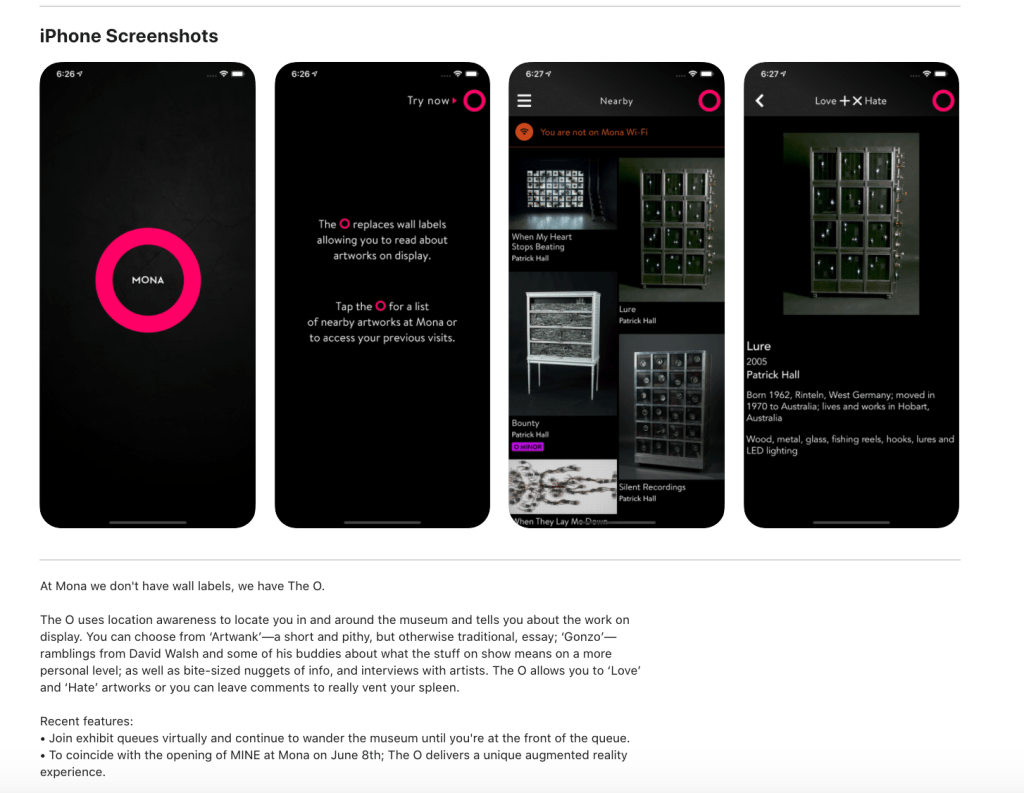
Museums host historical artefacts which require information for a visitor to be able to understand the significance of the item and then to assign meaning (Micha and Economou, 2005, p. 189) Historically museums have used “static” methods of providing explanatory information, including booklets, catalogues and labels (Martin, n.d.). In the South Australian Museum today we have seen the advent of VR technology (see the David Attenborough Great Barrier Reef exhibition that closed recently); use of interactive tablets (see their tablet based treasure hunt, The Shadow Initiation. More information on this one can be accessed on their website: https://www.samuseum.sa.gov.au/event/the-shadow-initiation.) The Museum of Old and New Art in Tasmania lets you have a free iPhone with headphones and when you are in front of an art piece will play you a recording of information about that piece from the artist, the MONA owner or a critic. Alternatively you can download the MONA app on your own smartphone and receive the same experience. I had a similar experience all throughout Moscow, where their major government owned galleries and museums provided either a device to provide you with a tour/information or you could download the same experience straight to your smartphone for free. Importantly, MONAs platform supports VoiceOver to allow disabled, blind and dyslexic people to access the service easily. See the below screenshot of the app page for this app and the following links for further information: https://mona.net.au/museum/the-o; https://apps.apple.com/au/app/the-o/id1161982400.

The use of personal digital assistants is growing rapidly in museums, and has obvious benefits where this is free, including making the public resource of the museum broadly accessible – especially in cases of language barriers such as my experience in Moscow having English among a dozen other languages provided on the PDAs. Of course security issues stem from this. Dara’s herself points out the inevitable risk of security breach of the networks that PDAs can be subject to. The intellectual property of the data that is contained on the PDAs in reference to museum produced or owned information is vulnerable to cyber attacks, an issue perhaps neglected by Dara in her analysis of the use of stolen data (Pryor, 2017). Additionally, member details including any financial data (donations, as well as on site purchases) may be subject to cyber security breaches also (Burke, 2019, pp. 160-161; Northrup, 2015; Pryor, 2015).

Limiting what users can access on PDAs which guide them through the museum using a management system will go towards preventing downloading malware after authentication has been performed by the user (Burke, 2019, o. 157; San Nicholas-Rocca and Burkhard, 2019, p. 61). Monitoring user access management continuously is critical to ensure the functioning of such restrictions from the internal viewpoint. Firewalls also protect from outside threats (Burke, 2019, p. 158). To protect the intellectual property from corruption or erasure back ups of information are critical in what Pryor (2017) refers to as ICT disaster recovery planning.

References:

Apple Application Store. (2020). The O app. Retrieved from: https://apps.apple.com/au/app/the-o/id1161982400.

Burke, J. (2019). Protecting Technology and Technology Users. In Burke, J. (ed.) Neal-Schuman library technology companion: A basic guide for library staff (6th ed.) (pp. 155-162). New York: American Library Association.

Dara, R. (2019). The dark side of Alexa, Siri and other personal digital assistants. Retrieved from: https://theconversation.com/the-dark-side-of-alexa-siri-and-other-personal-digital-assistants-126277.

Martin, J. (n.d.) From the static to dynamic: The evolution of museums and galleries. Retrieved from: https://www.quantumrun.com/article/static-dynamic-evolution-museums-and-galleries.

The Museum of Old and New Art. (2020). THE O. Retrieved from: https://mona.net.au/museum/the-o.

Micha, K. and Economou, D. (2005). Using Personal Digital Assistants (PDAs) to enhance the museum visit experience. In Bozanis, P. and Houstis, E.N. (eds.), 10th Panhellenic Conference on Informatics, PCI 2005 (pp. 188-198). Volas, Greece: Springer.

Northrup, L. (2015). Zoo and Museum Gift Shop Operator Confirms Details of Payment Data Breach. Consumerist. Retrieved from: https://consumerist.com/2015/10/15/zoo-and-museum-gift-shop-operator-confirms-payment-data-breach/.

Pryor, W. (2017). Staying safe: cybersecurity in modern museums. MW17: MW 2017. Retrieved from: https://mw17.mwconf.org/paper/staying-safe-cybersecurity-in-modern-museums-internal-external-and-hidden-threats-with-a-focus-on-cryptography-to-maintain-data-security/.

San Nicolas-Rocca, T. and Burkhard, R. J. (2019) Information Security in Libraries, Information Technology and Libraries, 38(2), 58-71. doi: https://doi.org/10.6017/ital.v38i2.10973.

South Australian Museum. (2020). The Shadow Initiation. Retrieved from: https://www.samuseum.sa.gov.au/event/the-shadow-initiation.

Week 2 – Networks and Internet Technologies

Canvas and Cloud Networks

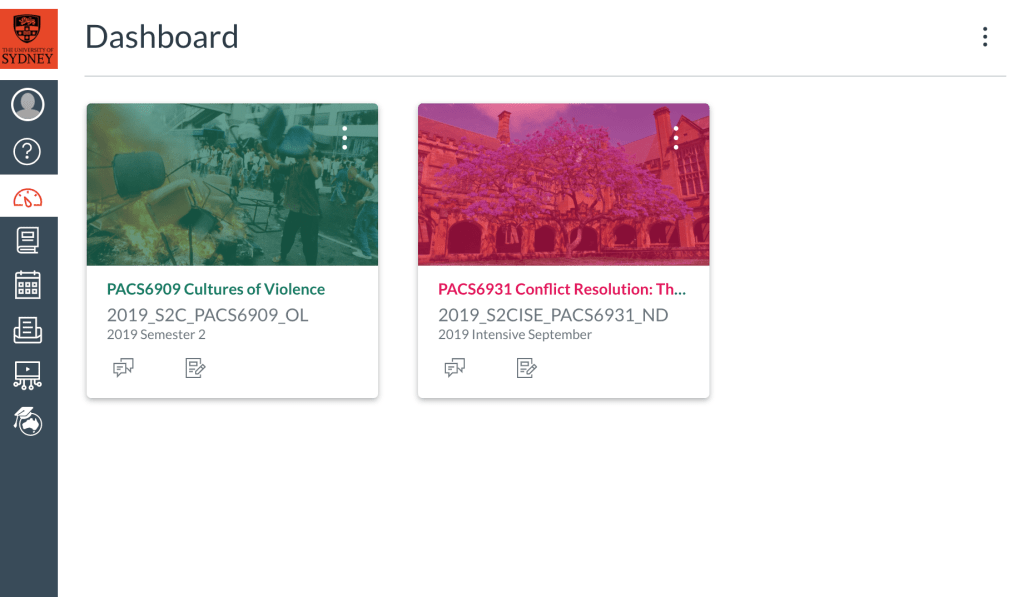
Quite a few different people have posted thus far about the physical IT networks that exist in their lives… I actually interpreted the question this week a little differently and thus will be discussing the cloud network that the University of Sydney uses called Canvas; with a discussion of cloud networking more generally. I have attached a screenshot of the home page of Canvas to start with.

Canvas

Internet access is required to actually use Canvas for the most part, but perhaps the best thing about the network is the fact that it is specially designed to upload files and documents which can then be downloaded.

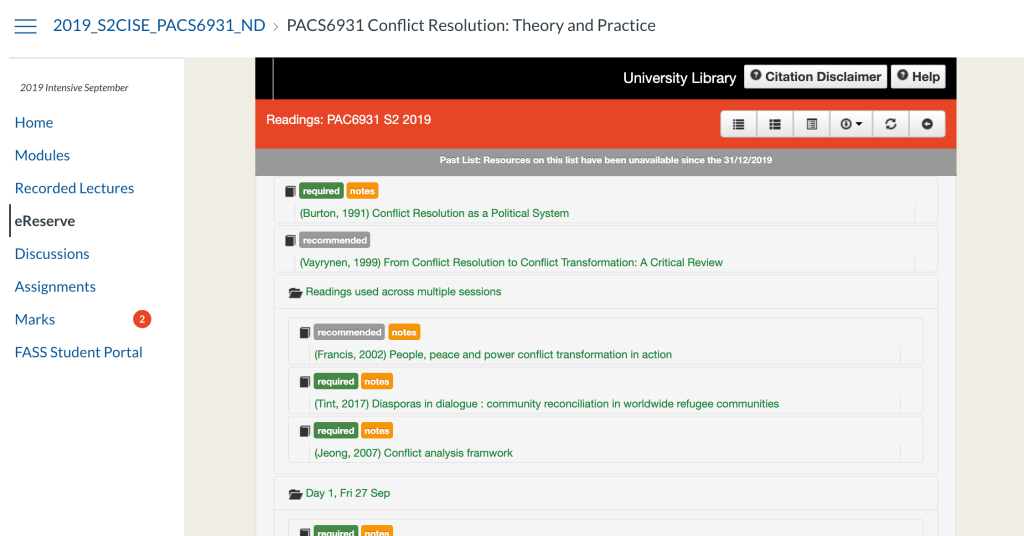
This feature is used to add every single required reading in PDF to the home page of each course you undertake, meaning you only have to access internet once to theoretically download every single resource you would need for the course, save for lectures. In this way, perhaps Canvas is almost the opposite of Burke’s second classification of IT that is adapted into library settings, and rather, is a technology that adepts library IT into it’s platform (Burke 2019, p. 14). Alternatively, perhaps the Canvas network be seen as an extension of the university library as per Burkhardt’s definition of “Emerging technolog[y] in the context of libraries, can be any tool that is being used in a novel way to serve your users” (Burkhardt, 2010 cited in Yang and Lee, 2015, p. 2). See screenshot below of the format of the Canvas-library integrated page from one of my courses.

Sharing options

It is network that is shared between the participants of each course, that is, lecturers and students. There is an option for individual private messaging though, and options to upload files to Canvas Commons. Interestingly the Canvas Commons is a free to access network for the general public, and it includes academic files, and even entire courses from universities all over the world.

A second interesting point is that “observers” are able to set up and link their accounts to monitor a course page (parents as the most obvious example). Observers can access, but not contribute to Canvas modules (Instructure, 2020).

Network

It is a cloud network hosted by GitHub, a cloud network hosting program (Hallmark 2020). Cloud computing, however, requires physical hardware; and does not merely exist in the abstract. Most of what I have described above is what is referred to as “cloud architecture” which must be separated from the “cloud infrastructure” (Azure, 2016).

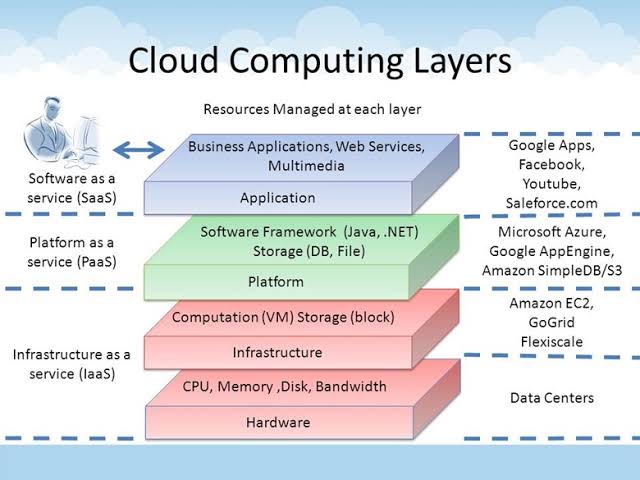
Infrastructure requires hardware, and a facility in what is termed the “physical resource layer.” Physical servers, internet routers, switches, power and cooling systems all form part of this hardware, and are often stored in a data facility, which I have attached a photo of below. This often includes not only the primary databases, but also a “slave” database (a copy of all information on the cloud). This pool of information that is stored is kept not only within the hardware, but in the virtualization layer of cloud networking, commonly referred to as the cloud itself. The next point of data access is through personal devices. See diagram below from Azure (2016).

Advantages and disadvantages

Cloud networks offer users great flexibility in terms of controlling access to data, and economic benefit also in that users, rather than having to purchase and then physically store data storage devices, can instead maintain an essentially weightless, virtual copy of all files. This is also more beneficial for people from lower socio-economic classes, who may not have access to a personal computer and only shared resources, for example, shared library computers. The cloud infrastructure includes at least 3 copies of data, including both physical and virtual, which can offer security against various forms attacks against data. The disadvantages include privacy concerns, with reference to corporations use of metadata and hacking. Would be very interested to hear others thoughts on cloud platforms and networks!

References

Azure, P. (2016). Cloud Infrastructure and Services [Blog post]. Retrieved from https://pdhewaju.com.np/2016/12/17/cloud-infrastructure-and-services/.

Burkhardt, A. (2010). What are emerging technologies? [Blog post]. Retrieved from http://andyburkhardt.com/2010/01/18/what-are-emerging-technologies.

Burke, J. (2019). The Universe of Library Technology, and Survey Says: How Library Staff Members Are Using Technologies in Burke, J. (Ed.) Neal-Schuman library technology companion: A basic guide for library staff (6th ed.) (pp. 1-23). New York: American Library Association.

Hallmark, E. (2020). GitHub Frequently Asked Questions. Retrieved from: https://github.com/instructure/canvas-lms/wiki/FAQ.

Instructure. (2020). Canvas. Retrieved from https://www.instructure.com/canvas/en-au.

Yang, S. Q., & Lee, Y. Y. (2015). Emerging Technologies Impacting Libraries in the Twenty-First Century in Yang, S. Q., & Lee, Y. Y. (Eds.) Emerging technologies for librarians: A practical guide (pp. 1-15). London: Elsevier Science & Technology.

Week 1 – Introduction

Hi all!

I’m Diane! I applied for this course and enrolled slightly late in this course on Friday (the last day to enrol) due to only applying and being offered a place in the Graduate Diploma of Information Management (Library and Information Management) last week. Previously I studied at the University of Adelaide where I graduated with a Bachelor of Laws (Honours) and Bachelor of Arts (Politics and International Studies). I also am completing my last subjects (a dissertation) in a Masters of Peace and Conflict Studies at the University of Sydney. All this research has made me appreciate the role that libraries, databases and academia more generally plays in our society- which is why I have enrolled in this course! I am passionate about facilitating access to information, particularly for people who may have historically been and may continue to be excluded from educational institutions and encouraging young people to engage with reading and learning. I am also interested in gaining more practical research know-how as I would like to complete a PhD next year.

Outside of academic, I like to travel, watch films, read and cook. I have just come back from a month in Kenya, Tanzania, the Democratic Republic of the Congo and the Republic of the Congo and before that I spent a month in Russia, before heading to Iceland. I went on all of these trips as a solo female traveller, and did a lot of (probably not OH&S approved) extreme sports, including snorkelling between the Eurasian and North American tectonic plates in Iceland and climbing Mt Kilimanjaro in Tanzania. Here is a photo of me falling over in front of Mt Kilimanjaro:

I have a goal to not only visit every country in the world, but read a book, watch a film and cook a meal from every country also! The last book I read was Human Acts, a fictional South Korean novel written by female author Han Kang about the Gwangju student uprisings in 1980 which truly reflects that democracy dies in darkness. Here is a review from a fellow female author:

https://www.washingtonpost.com/entertainment/books/han-kangs-human-acts-explores-the-long-shadow-of-a-south-korean-massacre/2017/01/19/96f9598c-de63-11e6-ad42-f3375f271c9c_story.html

Lastly, I love pigeons and used to have a pet pigeon called Mike Tyson.

Looking forward to spending this course, and the year, learning, reading and writing with everyone! 🙂

Design a site like this with WordPress.com
Get started